

What you install
You can use tuckit from the web page alone. What the install adds is not really a connection — it is a way of working, and the board is where it writes.
Three things arrive with it.
- A short note handed to the agent at the start of a session
- A nudge that fires once before the session ends
- A set of named ways of working
The first two are always on. The third loads only when it is relevant.
Claude Code, Codex CLI and Antigravity CLI all get the same set, so nothing on this page depends on which one you use.
Getting started
Section titled “Getting started”This is written for someone who already has a project a few months old. If you are starting from nothing at all, Try it in ten minutes is the shorter path.
You do not need to read code. Your part is pasting a few commands, answering three or four questions, and approving one list.
1. Make a tuckit account
Section titled “1. Make a tuckit account”Sign up at app.tuckit.dev and you get an organisation. An empty board is fine. Filling it is step 3, and the AI does it.
2. Install the plugin into your AI
Section titled “2. Install the plugin into your AI”In Claude Code, two lines inside a session.
/plugin marketplace add tuck-it/tuckit-plugins/plugin install tuckit@tuckit-pluginsThe first time it is used, a browser window opens and asks whether to allow it. Press allow. There is no long string to copy from one place into another.
Codex CLI and Antigravity CLI take different commands. Connect your agent has each one.
3. In your project folder, type this one line
Section titled “3. In your project folder, type this one line”Open your AI in the folder you have been building in, and paste this.
The tuckit board is empty. Use starting-with-tuckit to get this project onto it.starting-with-tuckit is a procedure name. You can usually skip it and be
understood, but naming it outright is the safer move on day one.
4. Answer three or four questions
Section titled “4. Answer three or four questions”The AI reads the code first: the folder structure, commits from the last couple of weeks, the branches and pull requests that are open right now. It drafts a proposal from that, and only then asks you anything. It does not hand you a blank page and ask how you would like things organised.
The questions are the ones the code cannot answer, which are mostly about who owns what.
“I see a
terraform/folder and some deploy config. Is that someone’s job, or does whoever ships a feature handle it?”
One at a time, three or four of them. Most are a choice rather than an essay, so there is little to write. “I don’t know” is a fine answer: when the answer would not change anything, the AI takes the narrower option.
It will not ask how you test, or how big the team is. A question whose answer does not change the board does not get asked.
5. Look at the list, then approve it
Section titled “5. Look at the list, then approve it”When the questions stop, it shows you everything it would create, in two blocks.
- Areas: the big buckets cards will live in. It proposes at most three. One is a perfectly good answer.
- Work already in flight: cards drawn from open branches and pull requests. At most five, each one saying where it came from.
This is where you say “drop that one” or “call it this instead”. Nothing is created until you approve it. tuckit has no delete, so anything made in error is something a person clears by hand on the web.
6. Here is what the board looks like
Section titled “6. Here is what the board looks like”Once it is made, every card sits in the first column (Needs design).
Including the ones drawn from a branch that is nearly finished.
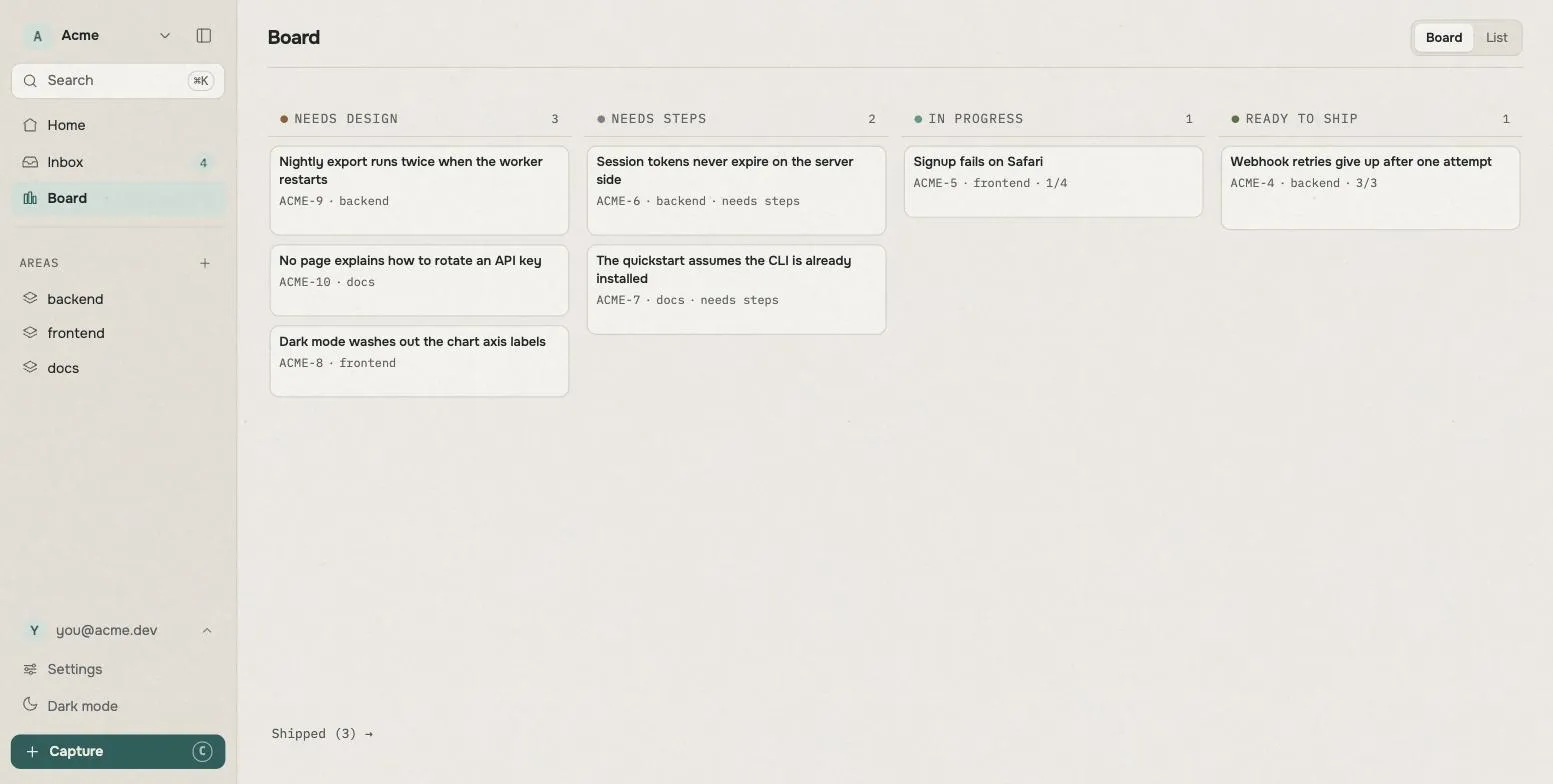
Nothing is broken. That column means nobody has written down what this is for. If a branch exists and no one recorded the intent, that reading is correct. Treat it as the first thing your board tells you.
The AI stops here and hands back. It does not carry on to the next thing by itself, because you are looking at a board you have never seen and should read it first.
7. Pick one and fill it in
Section titled “7. Pick one and fill it in”Open a card, copy its number (they look like ACME-42), and say:
ACME-42. Before we build it, let's work out what we're building.The AI asks one question at a time until the design holds up, then writes what
you agreed into the card’s what we’re building (Spec) box. The card moves
to the next column.
That is setup finished. From here on, the sentences below are the whole job.
What to say
Section titled “What to say”There is nothing to memorise. Say what you want in ordinary words and the AI picks the right procedure. This is here for the moments when you are staring at the prompt wondering what to type.
Starting your day
What's the state of this project?Show me what's sitting in the Inbox.Working out what to build
ACME-42. Before we build it, let's work out what we're building.ACME-42. What would we have to see to call this done?Getting it built
Pick up ACME-42.ACME-42. Split it up, put a separate agent on each piece, and review every one.Checking it is actually done
Run it for real and confirm the output before you tell me it's done.Land ACME-42 and record what shipped on the board.Before you close the window
Reconcile the board with what we just did.When the board has got messy
Too many cards are open. Show me what's worth closing, and why.If you don’t know what to type, the app writes it
Section titled “If you don’t know what to type, the app writes it”Open a card and the Hand to an agent button hands you the sentence that fits whichever column that card is in, procedure name and all, ready to copy.
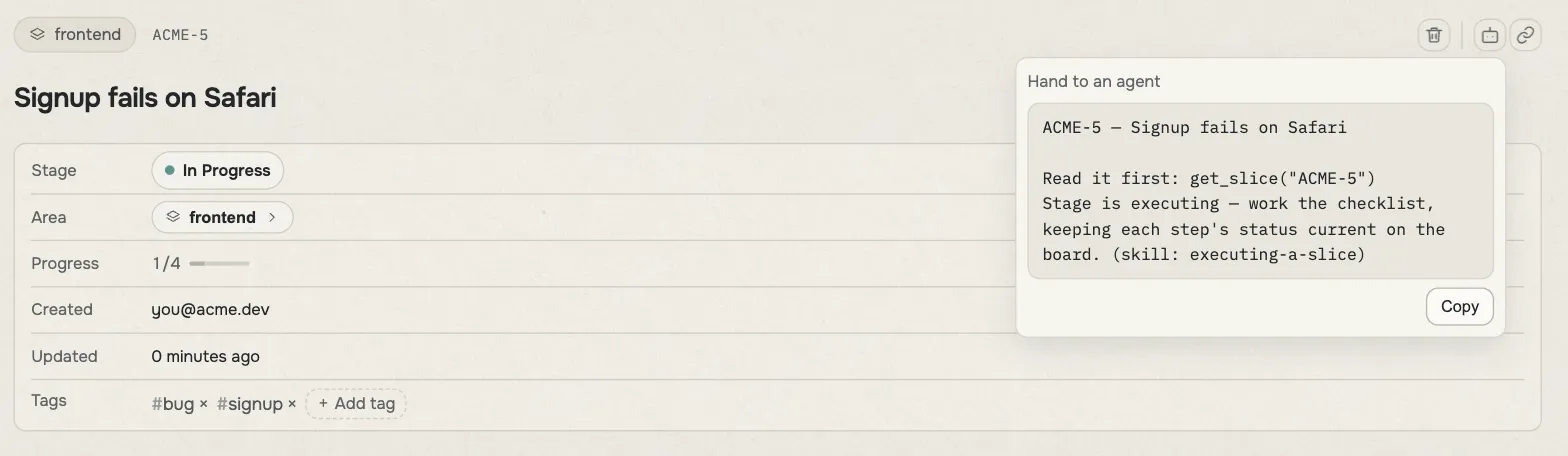
This card sits in In progress, so the sentence it offers ends in
(skill: executing-a-slice). Move the card and the sentence changes with it.
Pasting a card number is enough on its own
Section titled “Pasting a card number is enough on its own”Every card has a number like ACME-42, copyable from anywhere in the app. Paste
it into the chat and the AI goes and reads that card.
That is how you use it. What follows is what the plugin is doing underneath, for whenever you get curious.
At the start of a session
Section titled “At the start of a session”Open a new window and the agent reads a short note before it reads anything from you. In plain words, it says:
This project is tracked in tuckit. Where things stand, what is coming, and what was put off until later live in tuckit, not in the code and not in markdown files. Answer “where are we” from the board. Before you start anything, check whether a card already covers it, and continue that one.
It does one job: it makes the agent read the board instead of guessing from the code.
It types the sentences that The daily loop asks you to type, so most days you do not have to.
That note goes into every session, including the ones that never open tuckit at all. Which is why it stays short. Anything longer is kept in the parts that load only when they are needed.
Before the session ends
Section titled “Before the session ends”When the agent is about to finish, a nudge fires once.
If nothing about the board changed, it says nothing and stops. Most sessions are that one. If something did change, the agent takes one more pass first.
- Close what stopped being true. A card today’s work made unnecessary, a duplicate made earlier, a finding that turned out to be wrong. Closing is not deleting: the card, its contents and its history stay readable, and the only thing that goes away is the claim that someone is going to do it.
- Write down what was actually seen. Record it against the card’s done when, and leave a note about how it went.
- Ask before creating anything new.
The third one is the part worth knowing about.
New cards come as one list, at the end
Section titled “New cards come as one list, at the end”An agent notices work far faster than a person closes it. If it made a card each time it noticed something, the board would be an unread list inside a month.
So it collects them as it goes and shows you the whole batch at the end. One line each, with where it would go and why it is worth a card. Only what you approve gets made.
One more thing rides along: the agent also proposes a priority number for each. There is only one question in the session, so the ranking is asked in the same breath.
Change a number and it asks you why, once.
“Noted. What made TP-42 a 1 rather than a 3?”
That single line is the most valuable part of the loop. Sit anyone in front of an empty settings box labelled “what counts as urgent here” and they write nothing. Put a wrong ranking in front of them and the reason comes out immediately. Those sentences accumulate as your organisation’s own priority policy, and the agent ranks against that text next time.
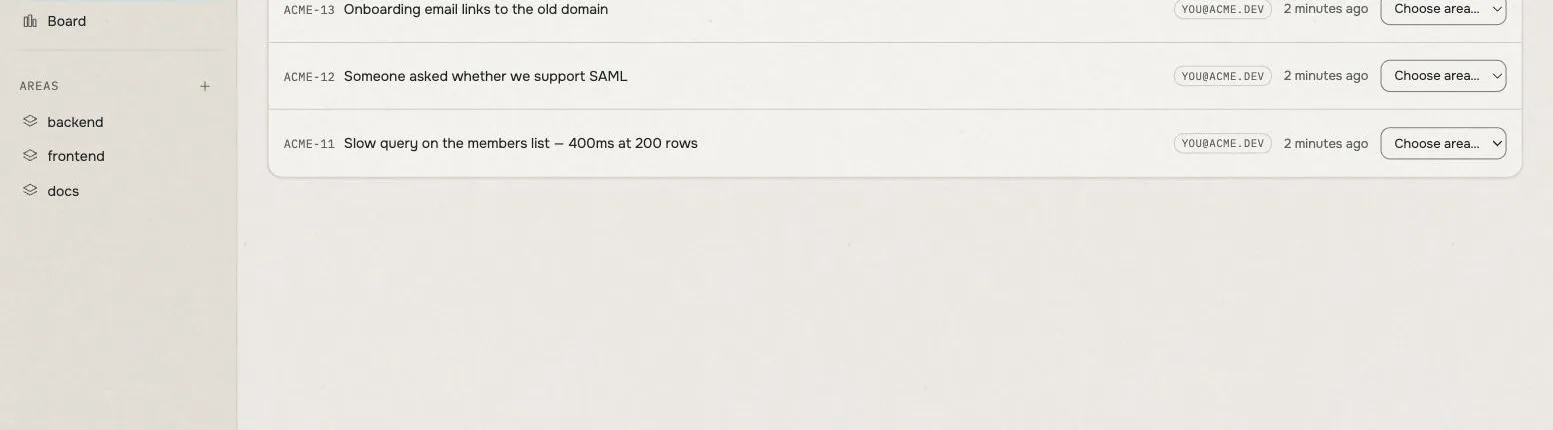
You do not have to decide where each one belongs. Approve it, let it land in the Inbox, and sort later.
The named ways of working
Section titled “The named ways of working”This is the larger half of the plugin.
The agent gets a set of written procedures, each one covering a situation: when this happens, do it like this. They are called skills. They are not loaded all the time. The agent pulls one in when the situation matches.
You do not have to memorise them. What follows is here so you know what exists, and can ask for one by name on the days something got skipped.
The column a card is in names the procedure
Section titled “The column a card is in names the procedure”The daily loop already said that each column names exactly one action. The plugin attaches a procedure to each of those actions.
| Column | Procedure | What it leaves on the card |
|---|---|---|
Needs design |
designing-a-slice |
Asks one question at a time until the design holds up, then writes what you agreed into what we’re building (Spec) |
Done when? |
designing-a-slice |
Writes what must not break (Constraints), then the one sentence somebody would have to see to call it finished (Done when) |
In progress |
executing-a-slice |
Builds against that sentence, goes and looks, and writes what it saw into Evidence. Anything deferred becomes a new card |
In progress (when the work splits cleanly) |
delegating-a-slice |
The same, with a separate agent on each piece and a review after every one |
Ready to ship |
shipping-a-slice |
Runs it for real, lands the branch, records what shipped. Calling it finished is a question for you |
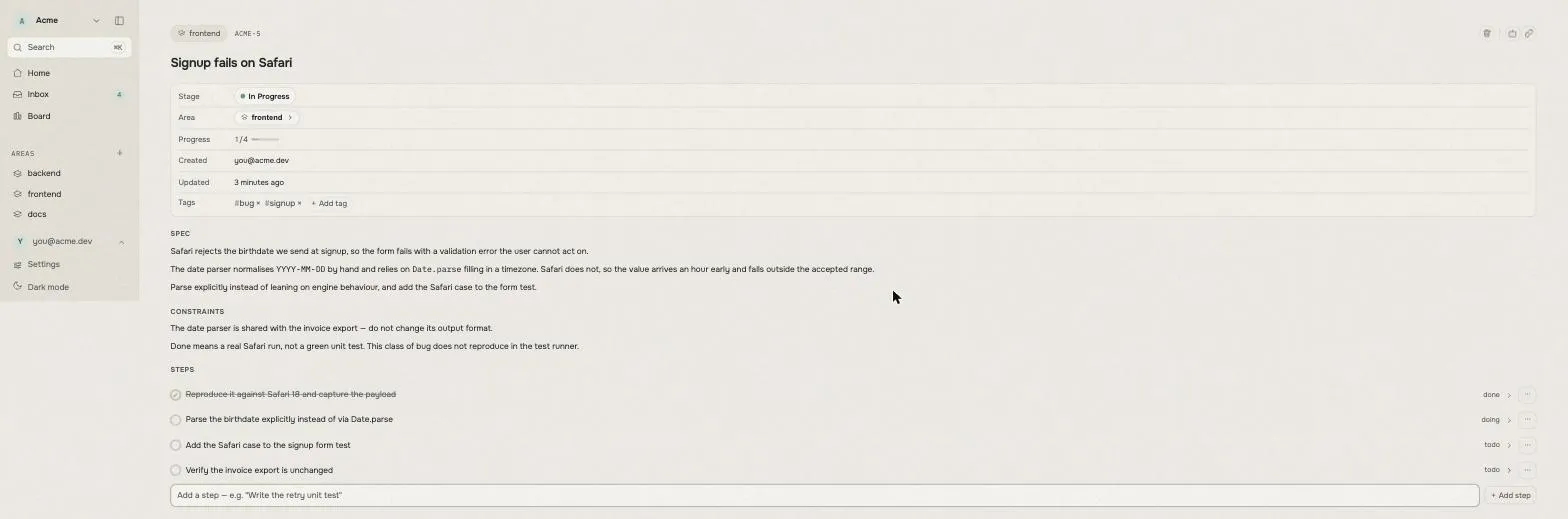
The point is the right-hand column. The design, the warnings and the progress all go onto the card rather than into a file. The next session does not need to know where that file was, because there isn’t one.
delegating-a-slice shows the difference best. An agent handed one piece gets a
card number and the piece it owns, and reads the rest itself. There is no brief
to write, so there is no brief to drift out of date. And if the coordinating
session loses its thread partway through, reading the board tells it how far the
work got, so it does not re-issue work that is already done.
The ones that get called mid-work
Section titled “The ones that get called mid-work”These have no column of their own. They govern how you carry out work you are already in the middle of. The procedures above usually call them, and you can call them yourself.
| Procedure | When | What it leaves on the board |
|---|---|---|
writing-tests-first |
Before writing implementation code | An agreed exception becomes a line in what must not break |
verifying-before-claiming |
Before saying anything is done | What was actually observed, written into Evidence |
debugging-systematically |
A bug, a test failure, anything unexpected | The rule learned becomes a constraint, the session becomes a note, an unrelated bug becomes an Inbox card |
requesting-a-review |
Work needs a reviewer’s eyes | Nothing. It produces findings |
receiving-a-review |
Feedback has arrived, before you act on it | What you are not fixing now is proposed as cards, and made once you approve |
verifying-before-claiming is the short one that catches the most. It stops the
agent saying “fixed” until it has run the check the card itself names and read
the output. It is also what writes Evidence, which is the only thing that
opens the ship button.
debugging-systematically has a stopping point built in. Three attempted fixes
that all fail means there is no fourth attempt. Instead it writes down the
conclusion that this is structural and cannot be fixed from here, puts it on a
card, and stops.
Keeping the board readable
Section titled “Keeping the board readable”Cards are free to make and free to keep. Left alone, a board drifts toward a state where every card is true and nobody reads any of them. These three are what stop that.
| Procedure | When | What it does |
|---|---|---|
reconciling-the-board |
A session is ending, or you want it tidied right now | The pass described in “Before the session ends” above |
filing-the-inbox |
Things have piled up with no area on them | Decides which are worth doing, files those, and proposes the rest for closing — one batch, not one question at a time |
clearing-the-board |
More open cards than anyone reads | Lists what it would close and why, and closes only what you approve |
reconciling-the-board is what the end-of-session nudge points at. The nudge is
the tap on the shoulder; this is the actual checklist.
clearing-the-board argues from why this one is dead, never from how old it
is. Age is not a reason. And it never closes anything on its own.
What it will not do without asking
Section titled “What it will not do without asking”A few things are fixed, and knowing them makes the rest easier to trust.
- Making a new card. Everything noticed during a session is collected and asked about at the end.
- Closing a card.
clearing-the-boardproduces a list and stops. - Creating the first areas and cards.
starting-with-tuckitdoes the same. - Calling something finished. That is a judgement rather than a calculation, so it stays yours.
The exception is anything you explicitly asked for during the session. That counts as already approved.
Worth knowing
Section titled “Worth knowing”Codex CLI has not been checked against a live install. It is built to the documented format, but nobody has installed it into a running Codex and watched it work. If the start note or the end nudge do not appear, the Codex tab in Connect your agent is where to look.
If you run Superpowers, do not run both. Several of these procedures are forks of Superpowers skills, changed in one way: what the original wrote into markdown files, these write onto the board. With both switched on, two procedures compete for the same moment, and whichever wins decides whether your design ends up in a file or on a card. This plugin takes the place of those.
You need Python 3. The start and end nudges run a small script. There is nothing to install beyond that.
Where to go
Section titled “Where to go”- The daily loop: the habit itself, which works with any AI. This page is the part that automates it.
- What’s on the screen: start here if
Spec, and why there are four columns, still feel unclear. - Connect your agent: when the install misbehaves.
- MCP tools: everything an agent can do to the board.
- The source is tuck-it/tuckit-plugins, MIT licensed. Every procedure is a readable markdown file, so anything you disagree with is something you can change.