

What's on the screen
There isn’t much to memorise. Three things and one distinction, and tuckit works out the rest.
The smallness is deliberate. A model small enough for an AI to hold all at once is one it doesn’t get wrong, and one you never explain twice.
Workspace
Section titled “Workspace”The container inside your account. One company, or one project, depending on how you split things. Every area, card and member lives inside one.
A workspace has a short lowercase name used in addresses. Call it acme and your
board is at /acme/board/. tuckit shortens that into the prefix on every card
number, so you get ACME-42.
Those numbers earn their keep. Paste ACME-42 into a chat and both a person
and an AI know exactly which card you mean.
One account can hold several workspaces, but one agent connection reaches exactly one of them. If you run more than one project, that choice matters. Running several projects is about making it.
A broad heading: frontend, backend, docs, infra.
Areas change rarely. They exist to hold cards, and an area is the only place a card can be filed. If you’re making an area per feature, you probably wanted a card.
Card (Slice)
Section titled “Card (Slice)”One piece of work, from the moment someone thinks it matters to the moment it’s finished. The same card the whole way.
There’s no lighter object to jot into and no heavier one to graduate to. A passing thought and a quarter’s work are both cards, and the difference is how much has been written into one.
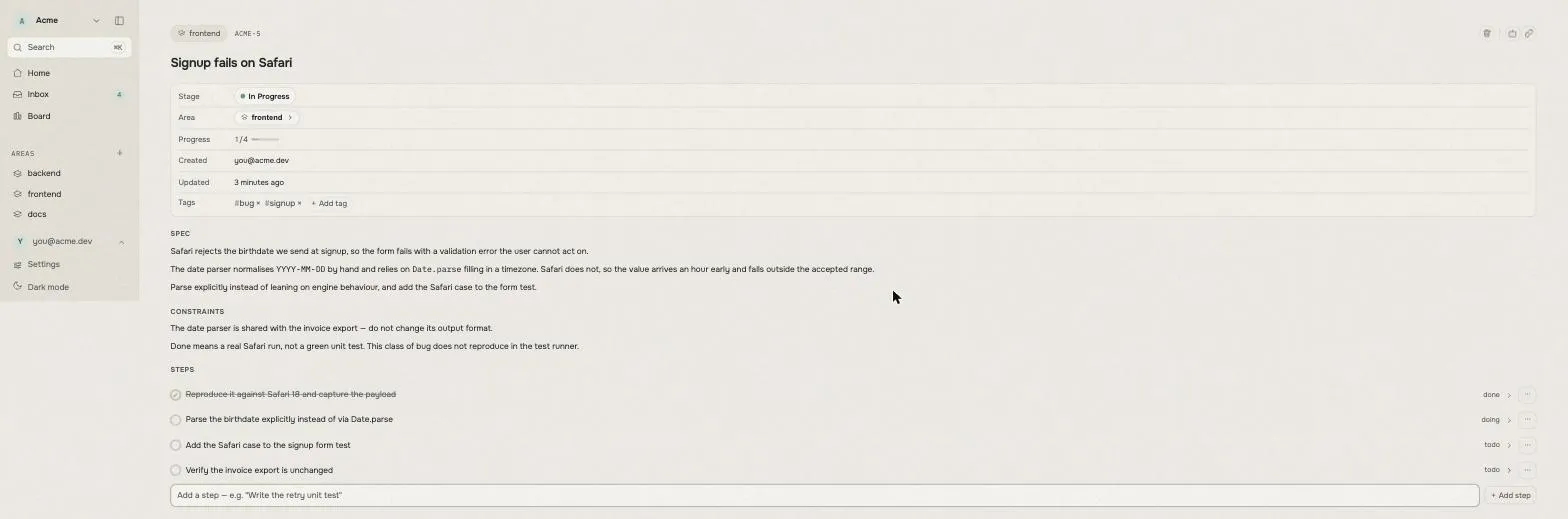
Inside are three boxes doing three different jobs. Keeping them apart is most of the skill.
What we’re building. Labelled Spec on screen. What you’re making and why.
Empty means nobody has worked it out yet, and that’s a useful thing for the
board to be able to say. Don’t fill it in just to make the card look complete.
What must not break. Labelled Constraints. The things a later reader would
get wrong if nobody told them. “Don’t touch the payment code.” “The invoice
export shares this function, so don’t change what it returns.” This is the box
that keeps working after the session ends. Write it as though handing the work
to someone who knows nothing.
Which area it’s in. Labelled Area. Empty means it’s still in the
Inbox.
Plus a number (ACME-42), a status, an assignee and tags.
The Inbox isn’t a separate place
Section titled “The Inbox isn’t a separate place”It isn’t a queue or a different kind of object. It’s the name for a card with no area that isn’t finished yet.
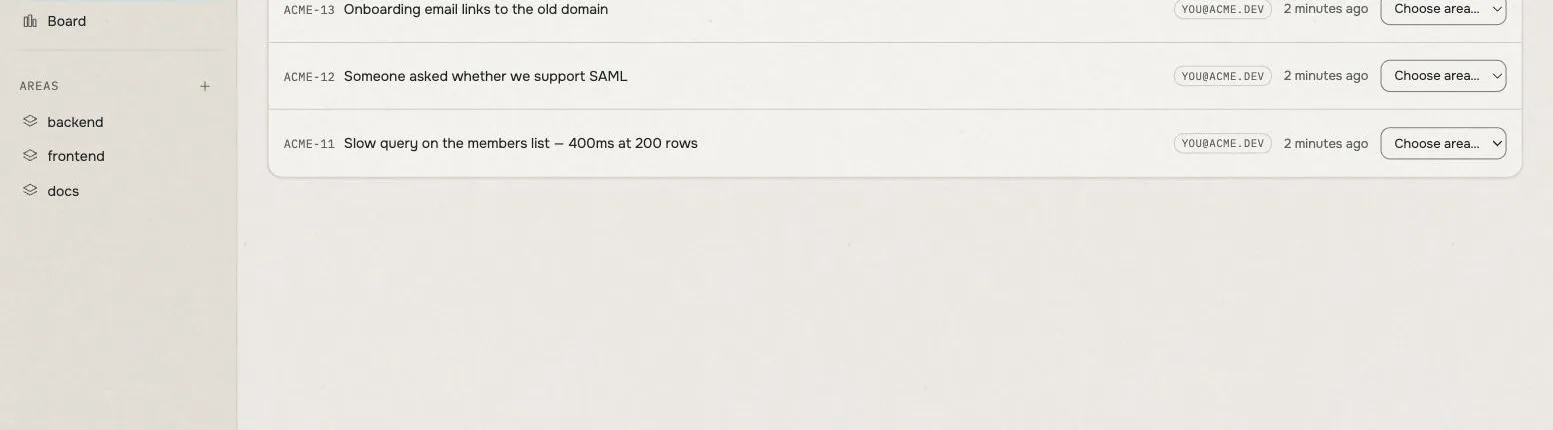
Writing something down before deciding where it goes is a proper path, not a fallback. You often know something matters before you know where it belongs. Setting an area files it; clearing the area sends it back. Both work.
Done when
Section titled “Done when”One sentence: what would somebody have to see to call this finished?
It’s a sighting, not a command. “Run the tests” is a command, and a card can satisfy it while the feature is still broken. “An expired token comes back as a 401 instead of an error buried in a success response” is a sighting, and it can turn out to be false — which is the only reason it’s worth writing.
Write it before the work starts. One written afterwards is a description of what somebody already did, and it can’t be missed, so it settles nothing.
Evidence
Section titled “Evidence”What was actually seen, once somebody went and looked. It’s stamped with when.
tuckit doesn’t judge it. It can’t run your tests, and it doesn’t pretend to. What it does is refuse to let a card be shipped while this box is empty — so the claim has to be made out loud, next to the work, where the next person reads it.
Emptying it puts the card back in progress. Nothing here is one-way.
Activity
Section titled “Activity”A running log underneath each card. It records what happened: what was tried, what broke, where the work landed. It only ever gets added to.
So three boxes cover three different tenses:
| Box | Tense | The question it answers |
|---|---|---|
Spec |
Future | What are we building, and why? |
Constraints |
Standing | What must never go wrong? |
Activity |
Past | What actually happened? |
What you decide, and what tuckit works out
Section titled “What you decide, and what tuckit works out”This is the one confusing part, and getting it wrong teaches the wrong habit. There’s a single test: who decides?
Status is a call a person made. One of open, shipped or dropped. It
never changes on its own.
Stage is worked out by tuckit. It looks at what’s inside the card and
recomputes every time. It isn’t stored anywhere, and neither you nor an agent
can set it.
| Stage | What it means | What moves it on |
|---|---|---|
needs_design |
The “what we’re building” box is empty | Work it out and write it in |
needs_done_when |
It’s written, but nobody has said what would settle it | Write the “done when” |
executing |
There’s a target and nothing has met it yet | Build it, then go and look |
ready_to_ship |
Somebody wrote down what they saw | A person calls it finished |
shipped / dropped |
Finished. Follows Status |
Nothing |
So nobody moves progress by hand. Write what you’re building, write what must not break, write what would settle it, then record what you saw — and the position follows. The only manual move is the last one, because “this is actually done” is a judgement rather than a calculation.
Read progress from Stage. Read decisions from Status. A card sitting at
open tells you nothing about how far along it is; one at ready_to_ship
tells you it’s waiting on you.
The board
Section titled “The board”The board groups cards by Stage, not Status. Four columns, showing only
work that’s moving.
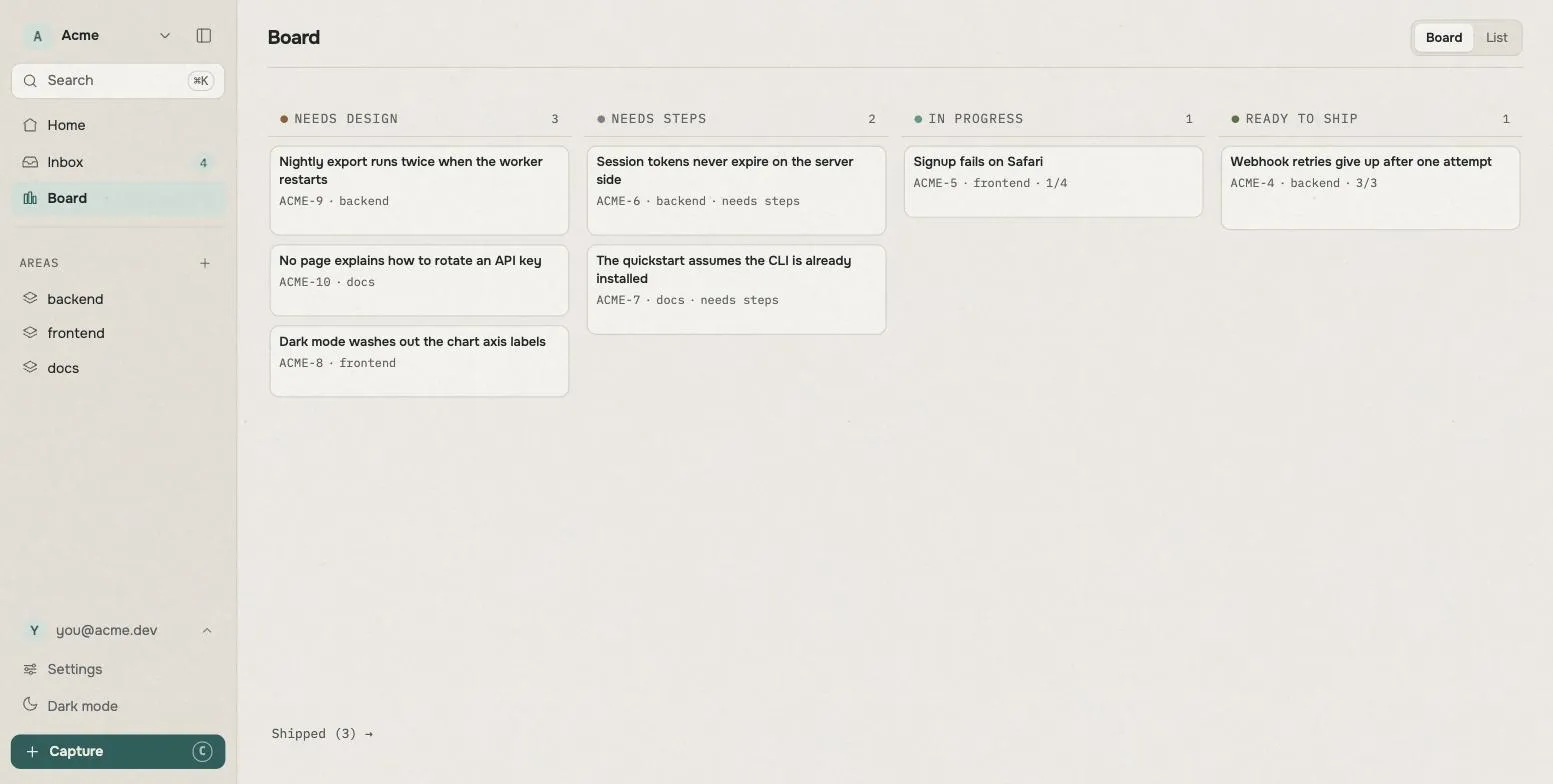
You can’t drag cards between columns, because a card’s column comes from its contents. Dragging a card into the “worked out” column wouldn’t work it out.
Finished (Shipped) and abandoned (Dropped) aren’t columns. They sit below
the board as counts you can click through, so finished work stays findable
without taking up room that moving work needs.
Start to finish
Section titled “Start to finish”- Something comes up. Write it down as a card with no area. It lands in the Inbox.
- Decide it’s worth doing. Give it an area. Reversible.
- Work out what to build and write it into
Spec. Pastneeds_design. - Write what would settle it into done when. Now
executing. - Build it, go and look, and write what you saw into evidence. That is
ready_to_ship. - Call it finished. The one part that’s yours.
Anything put off for later belongs on the board too. A committed next step is a card with an area; a vaguer idea is a card with none. Something that exists only in a chat window doesn’t exist.
The same thing, worked through
Section titled “The same thing, worked through”Monday, you notice signups break on Safari. You make a card called Signup
fails on Safari and type nothing else. No area, so it’s in the Inbox; the
“what we’re building” box is empty, so its stage reads needs_design. Total
effort: a title.
Wednesday, you decide it matters. You put it in the frontend area. It leaves
the Inbox and joins that area’s list. Still needs_design, because nobody has
worked out what the fix is.
Thursday, you and your agent find the cause and it writes the finding into
Spec. It also writes into Constraints: the date parser is shared
with the invoice export, so don’t change what it returns. That’s the sentence
that keeps working after the session ends. The stage becomes needs_done_when
on its own.
Then it writes the done when: a date typed in the invoice export comes back
the same after a save and a reload. The stage becomes executing.
It does the work, then actually opens the export, saves, reloads, and writes
what it saw into evidence. It leaves a note in the log with a link. The
stamp on the evidence makes the stage read ready_to_ship.
Nobody moved that card. You set three things (an area, what you’re building, what must not break) and one remains: deciding it’s actually done.
Words you won’t find here
Section titled “Words you won’t find here”Older writing about tuckit mentions Org, Ticket and Plan. All three are gone. Tickets and plans folded into the single card, because making people pick an object type before they knew what the work was turned out to be the problem. And org became workspace, because a plan is bought per workspace and nobody owns three organisations.
The words are workspace, area, card, done when and evidence. That’s the list.